TABLE OF CONTENTS
- About Account Suspensions on iNaturalist
- Suspension Guidelines
- How to suspend an account
- How to edit a suspension
- How to reinstate an account
About Account Suspensions on iNaturalist
iNaturalist has Terms of Use and Community Guidelines that community members agree to follow. We believe these help foster a civil atmosphere that allows for disagreement and evidence-based discussion, as well as protect data quality, which aid iNaturalist’s mission to connect people to nature and advance biodiversity science and conservation.
Accounts that do not abide by the Terms of Use or Community Guidelines may be suspended to stop or prevent behavior that is detrimental to iNaturalist and its mission. iNaturalist site curators, site admins, and staff members are able to suspend an account.
When an account is suspended, no one can log in to it and use it for the period of the suspension. Suspensions may be temporary or indefinite. They should not be applied retroactively if the behavior has not occurred in months or years.
In rare cases a person may be banned from using iNaturalist.
Suspension Guidelines
Below are suggested guidance for warnings and suspension times that we ask staff, site admins, and volunteer curators to follow for common suspendable infractions. This is not an exhaustive list. Accounts can be suspended for other reasons, such as a continued pattern of rudeness, or needing to have the last word, for example. These are subject to curator and staff discretion.
While there are always gray areas and unusual circumstances, decisions to deviate from these guidelines should be made after consulting another curator or staff member. If you’re unsure of what to do, consult other curators or contact iNaturalist Support. In severe cases, overriding these guidelines may be necessary.
Keep in mind that “incident” is not as granular as “each specific insult in one comment counts as one incident.” Unless it’s particularly egregious, each overall incident (e.g. a bad-tempered exchange in which several insulting comments are used, or posting a batch of photos flagged as copyright infringement) reviewed by curators counts as an “incident”.
(These guidelines were last updated on July 31st, 2026. Contact us if you have feedback.)
| Infraction | First incident | Second incident | Third incident | Fourth incident |
| Minor insult | Offending content flagged and hidden, user warned. | One day suspension. Offending content flagged and hidden. | One week suspension. Offending content flagged and hidden. Curator status revoked. | Two week suspension, potentially indefinite suspension. Offending content flagged and hidden. |
| Major insult | Immediate one day suspension. Offending content flagged and hidden. | One week suspension. Offending content flagged and hidden. Curator status revoked. | Two week suspension. Offending content flagged and hidden. | Indefinite suspension. Offending content flagged and hidden. |
| Threat | Immediate one week suspension. Offending content flagged and hidden. Curator status revoked. | One month suspension. Offending content flagged and hidden. | Indefinite suspension. Offending content flagged and hidden. | |
| Discrimination | Discriminating content flagged and hidden, user warned. | Three day suspension. Offending content flagged and hidden. Curator status revoked. | One week suspension. Offending content flagged and hidden. | Two weeks suspension, potentially indefinite suspension. Offending content flagged and hidden. |
| Hate speech | One week suspension. Offending content flagged and hidden. | One month suspension. Offending content flagged and hidden. Curator status revoked. | Indefinite suspension. Offending content flagged and hidden. | Ban from iNaturalist. Offending content flagged and hidden. |
| Sockpuppeting | Primary account is suspended for one week. Permanent suspension of sockpuppet account(s) and removal of its/their content after one week, pending appeal. Curator status revoked. | Primary account is indefinitely suspended. Sockpuppet account(s) suspended and its/their content removed after one week, pending appeal. | ||
| Sexually explicit human content | Indefinite suspension of account for investigation. Hide content and contact iNaturalist Support for removal of explicit material. Curator status revoked. Possible ban if there’s reason to believe it was intentional by the account owner. | Account banned. | ||
| Harassment | Depending on severity, suggest that blocking be used at first. If the harassment is clear hate speech/insults, etc., suggest blocking and also follow the guidelines for those offenses. | Usually this means a sockpuppet is being used, please contact iNaturalist Support. Indefinite suspension. | ||
| Copyright infringement of photos or sounds | Flag as copyright violation. Warn user. Add a moderation note that you warned the user. | Suspend for 3 days, flag content. Curator status revoked. | Suspend indefinitely. | |
| Posting Artificially Generated Media | Flag as artificially generated. Warn user. Add a moderation note that you warned the user. | Suspend for 3 days, flag content. Curator status revoked. | Suspend indefinitely. | |
| Intentionally adding false IDs, Data Quality Assessment (DQA) votes | Flag the IDs and hide them. Contact iNaturalist Support for removal of false DQA votes. Warn user. | One week suspension. Curator status revoked. Flag the IDs and hide them. Contact iNaturalist Support for removal of false DQA votes. | Two week suspension. Flag the IDs and hide them. Contact iNaturalist Support for false DQA votes. | Indefinite suspension. Flag the IDs and hide them. Contact iNaturalist Support for false DQA votes. |
| Continued activity that reduces data quality (such as adding many poor IDs) | Let user know that their activity may actually be harming iNaturalist. Warn user. | Suspend for three days. Contact iNaturalist Support if large amount of data needs to be removed or withdrawn. Curator status revoked. | Suspend for one week. Contact iNaturalist Support if large amount of data needs to be removed or withdrawn. | Suspend indefinitely. Contact iNaturalist Support if large amount of data needs to be removed or withdrawn. |
| Machine generated content | Contact iNaturalist Support so we can investigate. Loss of App Owner privileges. Machine generated content (possibly including app) removed. Curator status revoked. | Indefinite suspension, machine-generated content removed. |
Infraction definitions
Hate speech: Hate speech is content consciously designed to attack people based on age, race, gender, sexual orientation, income, physical ability, country of origin, religion, educational background, or any other attribute that people are unable to control. This includes misgendering (intentionally not using or stating intention not to use someone’s stated pronouns).
Insult: Insults are attacks meant purely to belittle or offend people. A "minor" insult would be something relatively tame but that still meets the definition of an insult. Rudeness and curtness are not necessarily insults.
Threat: A threat is any content that indicates an intent to harm another person. Note that warnings about suspension or other regulatory actions on the part of site staff or site curators on iNaturalist are not threats.
Sockpuppet accounts: A sockpuppet account is an additional account set up to evade suspension, circumvent restrictions in functionality, or other forms of bad behavior, like confirming one's own identifications. This does not include multiple accounts set up for multiple roles, e.g. a personal account and a professional account.
Intentionally false/joke IDs, Data Quality Assessment (DQA) votes: We expect users to submit information that they believe is an accurate assessment of the evidence provided, and not intentionally false. It's OK to make an incorrect identification or accidentally add an incorrect date or something, but it's not OK to intentionally add an incorrect identification or add an intentionally false vote to the Data Quality Assessment.
Machine generated content: We do not allow machines to generate and post content on iNat with no human oversight curating each piece of content, and any account suspected of doing so is subject to suspension and the removal of the content. Read more about what constitutes machine generated content here.
Discrimination: Discrimination against people based on age, race, gender, income, physical ability, country of origin, educational background, or any other trait that they can't control. This includes telling people not to bother identifying observations because they're "just a kid" or "clearly don't know what they're talking about." This may differ from the use of hate speech described above in that it is not necessarily a direct, self-consciously-inflicted attack. Just because this kind of discrimination is implied or done unknowingly doesn’t make it OK, but neither is it necessarily grounds for immediate suspension.
Copyright infringement of photos or sounds: posting photos one does not own likely represents copyright infringement. Photos attached to observations should be made by the observer who owns the account, depicting the organism at the time and place of the observation. A user who posts photos by a friend with permission every once in a while is OK, but if it's done a consistent basis it's not appropriate for iNaturalist.
Posting Artificially Generated Media: posting photos or sounds that are entirely artificially generated, or have been edited in a way to make it an inaccurate depiction of the scene. See more here.
Continued activity that reduces data quality (such as adding many poor IDs): any account that adds content we believe decreases the accuracy of iNaturalist data may be suspended, particularly if that account behaves like a machine, e.g. adds a lot of content very quickly and does not respond to comments and messages. For example, an account that blindly agrees to many IDs, or adds a lot of incorrect or highly suspect IDs to others' observation, or posts intentionally false observations.
Harassment: repeated, targeted, unwanted and intimidating interaction with another user or their content, or indirect interaction, such as defamation.
Sexually explicit human content: human nudity of a sexual nature, pornography.
Intervention definitions
Warning: a civil comment or a message to an account with an explanation of why their action(s) violated the Community Guidelines/Terms of Use and what consequence will follow if they continue to violate guidelines or Terms of Use. It should not be written as a threat, but neutrally.
Hiding: content may be hidden from public view if it’s deemed harmful to the iNaturalist community or to data quality. Only the account which posted the content, as well as Curators and Staff, can view hidden content.
Removal of content: staff may, at their discretion, remove content that we deem harmful to iNaturalist’s community or to data quality. This includes intentionally false content, machine generated content, content created by sockpuppet accounts, hate speech, pornography, and the like. Curators not able to remove content, only hide it.
Suspension: an account is inaccessible and no one can log into it. This can be temporary or indefinite. An indefinite suspension requires the user to contact support to discuss terms of potential reinstatement.
Ban: a person is permanently suspended from using iNaturalist.
Curator status revoked: if the user is a site curator, that status will be revoked by staff. It's possible they may re-apply in the future, but that will depend on the nature and severity of the infraction, and needs to be addressed in their new curator application.
How to suspend an account
Below are instructions for how to suspend an account.
- Go to the profile page of the account in question.
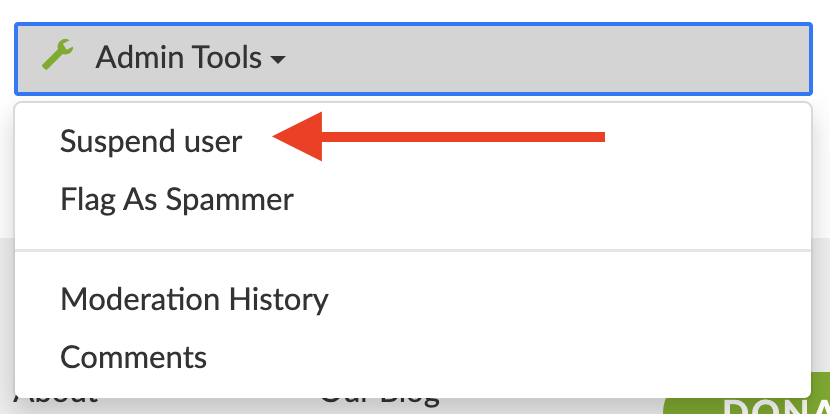
- On the bottom left-hand side, click on "Admin tools" and select "Suspend user".
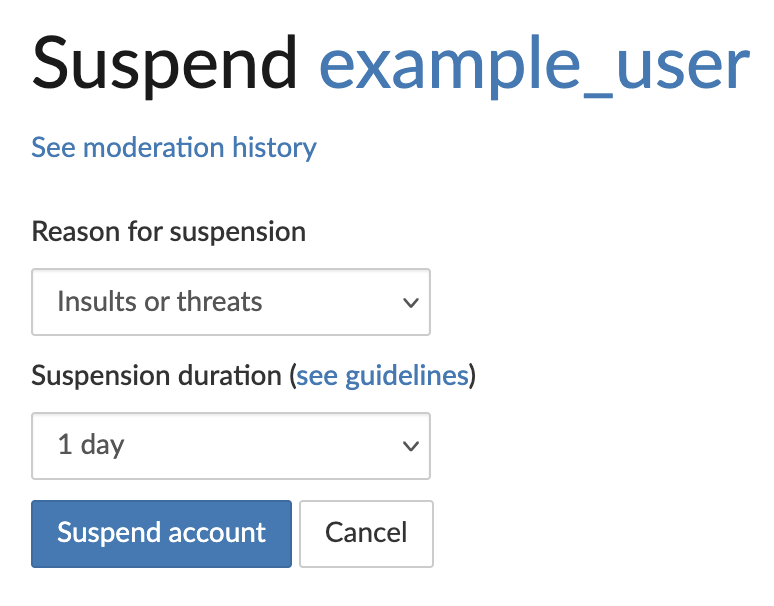
- On the suspension page there are two main sections: "Reason for suspension", and "Suspension Duration".
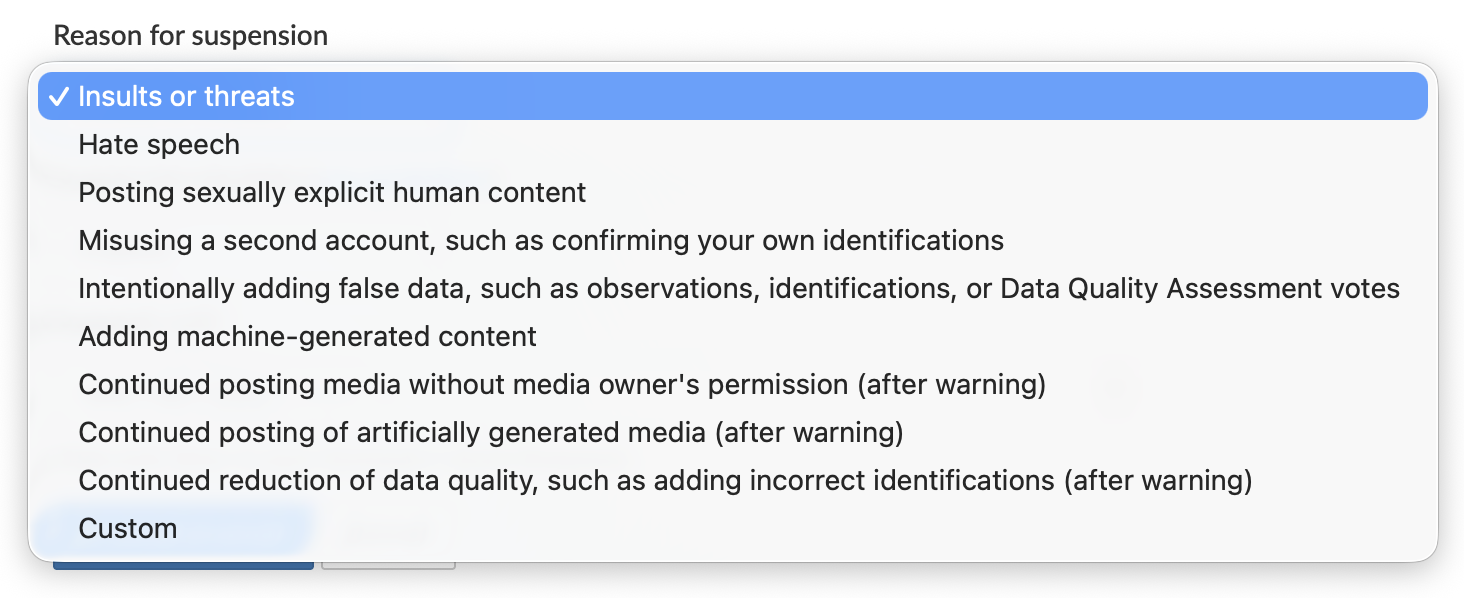
- Click on "Reason for suspension" and you'll see several standard reasons, as well as a "Custom" option. Select the most appropriate standard reason, or select "Custom" to write a custom explanation. Keep in mind that whatever is chosen or written here will be emailed to the account when they are suspended, and will be displayed when they try to log in during the suspension period. Please write civil, straightforward, and non-personal text and cite Community Guidelines if using the "Custom" option.
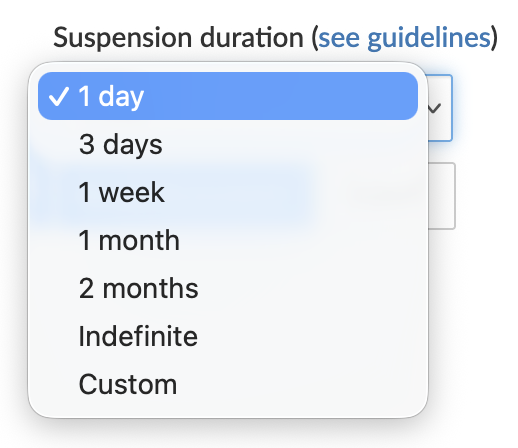
- Once you have selected a reason, you now must choose the suspension duration. Please follow the guidelines listed above as much as possible. If you choose "Custom", you will be shown a date and time chooser that displays dates and times in your current time zone.
- Once you have chosen the reason and duration, click "Suspend user".
- When the user is suspended, they will receive an email from iNaturalist notifying them of their suspension, the reason for their suspension, and the duration of their suspension. They will be able to appeal their suspension by contacting iNaturalist. The identity of who suspended the account is not divulged.
- When the suspension period is over, the account will be reinstated automatically and iNaturalist will email the account, letting them know the suspension is over and they can log in again.
How to edit a suspension
You may need to edit a suspension to update the suspension reason or change the suspension duration.
- Go to the profile of the user in question.
- Click on "Admin tools" and select "Edit suspension".
- You'll be taken to the Edit Suspension page, which looks like this:
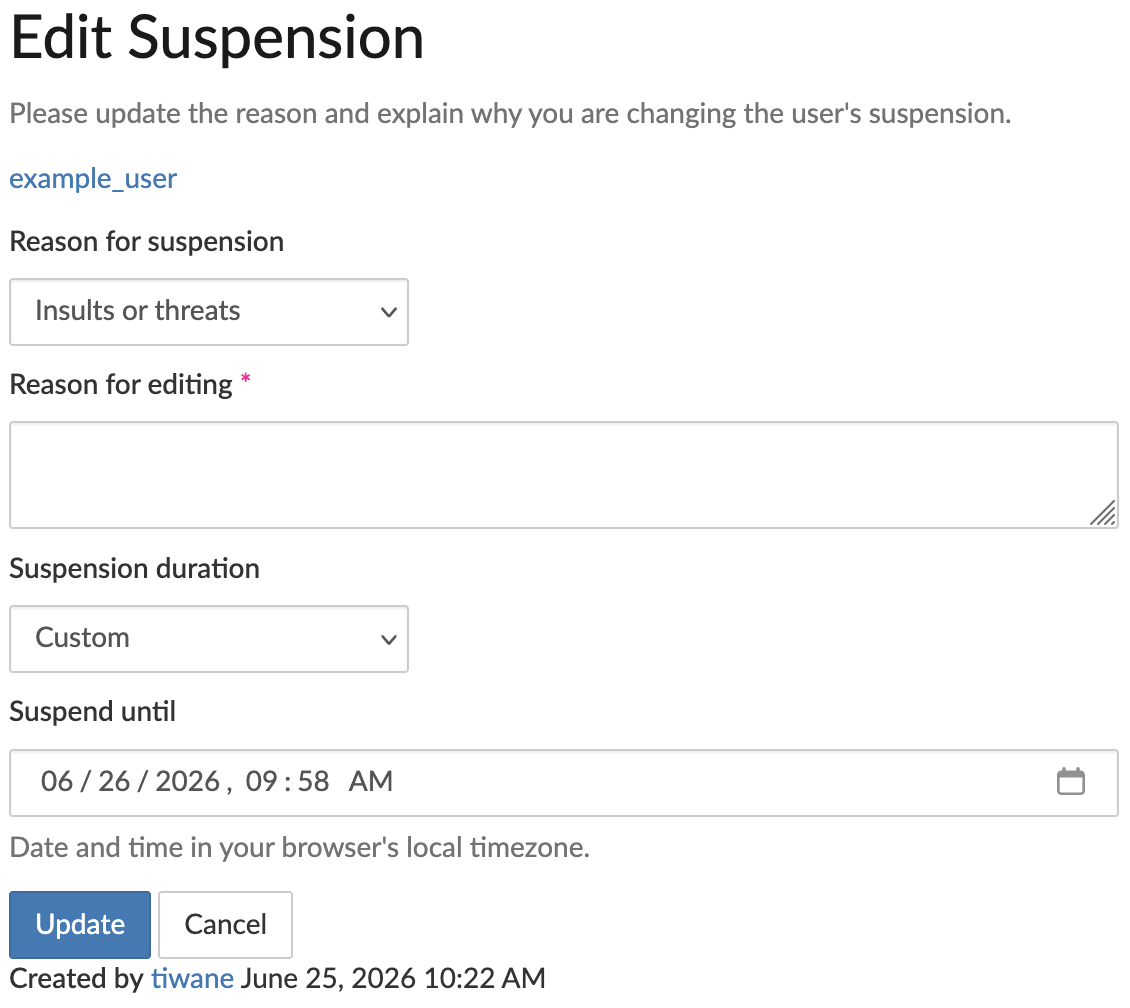
- Here you can update the suspension reason and/or the suspension duration. You must include an explanation in the "Reason for editing" field.
- Click "Update" to save your edits.
How to reinstate an account
To reinstate, an account:
- Go to the profile of the user in question.
- Click on "Admin tools" and select "Reinstate account".
- Enter a reason for reinstating the account, then click "Reinstate account".
- The account will be reinstated and iNaturalist will email the account, letting them know the suspension is over and they can log in again.
Was this article helpful?
That’s Great!
Thank you for your feedback
Sorry! We couldn't be helpful
Thank you for your feedback
Feedback sent
We appreciate your effort and will try to fix the article